Data Extraction API
Overview
The Data Extraction API enables you to export data from Skills Workflow into external tools and systems—such as Excel, Power BI, or custom applications—by dynamically querying named data sets.
Purpose
The Data Extraction API is intended for reading and exporting data from Skills Workflow in a structured and efficient way. It is ideal for reporting, dashboards, and integration with external BI or analytics tools.
Use Cases
Export data from Skills Workflow to:
- Excel, Power BI, Google Sheets
- Custom dashboards or internal reporting systems
- Third-party analytics tools
- Automation tools like Zapier or Make (Integromat)
- Data warehouses or ETL pipelines
Key Limitations
- Read-only: This API does not support creating or updating records.
- Depends on predefined data sets.
- Pagination recommended: Use pagination (skip/take) for large queries to avoid timeouts or incomplete results.
- Rate limits may apply: For high-frequency requests, consider caching or batching.
Getting Started
Authentication
Before calling any endpoint, you must obtain the following credentials from our Support team:
- App Key (
X-AppId) - App Secret (
X-AppSecret) - Tenant ID (
X-AppTenant)
These are provided by the support team upon request.
Include them in each request via HTTP headers:
X-AppTenant:  <X-AppTenant>
X-AppId:      <X-AppId>
X-AppSecret:  <X-AppSecret>
X-AppUser:    <UserId>     # Optional, if user-scoped filtering is required
Content-Type: application/json
Environments
The API is available in four environments, depending on your subscription plan:
- Development
- Test
- UAT
- Production
Each environment has its own base URL:
{{ApiUrl}}/api/v3/analytics
Postman Collection
To facilitate testing of the available queries, we provide a Postman collection file with all endpoints configured. You can download it from the link below:
Download Postman Collection - Data Extraction
After downloading, make sure to configure the variables {{ApiUrl}}, {{TenantId}}, {{AppId}}, {{AppSecret}}, and {{UserId}} according to the credentials you have been given.
Rate Limits
Each request must complete within 30 seconds.
- Apply filters to narrow the data set.
- Use pagination (
skip/take) to retrieve large data sets in chunks.
Filtering Data
To flexibly extract data, use the queryBuilder object in your POST body. It supports:
| Property | Type | Description |
|---|---|---|
skip | integer | Number of records to skip (for pagination). |
take | integer | Maximum number of records to return. |
orderBy | array | List of { field, direction } objects to sort results. |
fields | array | List of field names to include in the response. |
filters | array | Complex filters combining expressions, e.g. [["Status","=","Open"],"and",["Priority",">",2]]. |
Filter Operations
The following table lists available filter operations by data type. The Query Builder uses the first operation in each array as the default operation for the specified data type.
| Data Type | Filter Operations |
|---|---|
string | contains, notcontains, startswith, endswith, =, <>, isblank, isnotblank |
numeric | =, <>, <, >, <=, >=, between, isblank, isnotblank |
date, datetime | =, <>, <, >, <=, >=, between, isblank, isnotblank |
boolean | =, <>, isblank, isnotblank |
object | isblank, isnotblank |
{
  "queryBuilder": {
    "skip": 0,
    "take": 100,
    "orderBy": [
      { "field": "UserId", "direction": "asc" }
    ],
    "fields": ["Team", "UserId"],
    "filters": [
      ["Team", "=", "Executor"],
      "or",
      ["Team", "=", "Requester"]
    ]
  }
}
Discovering Available Fields
To know which fields you can request, perform an initial call with only pagination:
POST {{ApiUrl}}/api/v3/analytics/named-query/DE-Clients/dynamic-execute
Headers:
  X-AppTenant: <TenantId>
  X-AppId:     <AppKey>
  X-AppSecret: <AppSecret>
Body:
{
  "queryBuilder": {
    "skip": 0,
    "take": 100
  }
}
This returns up to 100 records and reveals all available properties in the response schema, which you can then reference in subsequent queryBuilder.fields and queryBuilder.filters.
Endpoints
The collection includes several dynamic-execute endpoints, each under:
POST /api/v3/analytics/named-query/{NamedQuery}/dynamic-execute
Where {NamedQuery} is one of:
Named Queries and Available Filters
Below is a list of available Named Queries and their applicable filters (if any).
| NamedQuery | Description | Filters | Columns | Details |
|---|---|---|---|---|
| DE-Bills | Extracts data for bills. | — | 54 | View |
| DE-Leaves | #Description | |||
| Contains documents with information about vaca… | — | 17 | View | |
| DE-Assignments | Extracts the teams of users associated with each document. | — | 10 | View |
| DE-Attendances | Extracts data on attendances. | — | 16 | View |
| DE-Brands | Extracts the list of brands. | — | 5 | View |
| DE-BusinessObjectTypes | Extracts business object types. | — | 6 | View |
| DE-Cities | Extracts all cities. | — | 4 | View |
| DE-Clients | Extracts the list of clients. | — | 30 | View |
| DE-ClientsCompanies | Extracts the information about what companies have access t… | — | 4 | View |
| DE-Comments | Extracts comments from the feed. | — | 13 | View |
| DE-CommentsReplies | Extracts replies of comments. | — | 12 | View |
| DE-Companies | Extracts the list of companies. | — | 25 | View |
| DE-CompaniesAdditionalInformation | Extracts the custom fields associated with the companies. | — | 3 | View |
| DE-Contracts | Extracts contracts information. | — | 0 | View |
| DE-Countries | Extracts the list of countries. | — | 2 | View |
| DE-Currencies | Extracts the list of currencies. | — | 5 | View |
| DE-Departments | Extracts the list of departments. | — | 7 | View |
| DE-Descriptions | Extracts the different versions of the descriptions of docu… | — | 12 | View |
| DE-Divisions | Extracts the list of divisions. | — | 4 | View |
| DE-Employees | Extracts employees. | — | 9 | View |
| EstimatedPlannedActualMonthly | System generic extraction of estimated, planned and actual,… | — | 45 | View |
| DE-Estimates | Extracts the list of estimates. | — | 0 | View |
| DE-EstimatesBillingConditions | — | — | 21 | View |
| DE-EstimatesCount | Gets the count of estimates for the given filters. | — | 1 | View |
| DE-EstimatesQuotes | Extracts the estimate details. | — | 62 | View |
| DE-EstimatesQuotesCount | Counts the occurrences of quotes. | — | 1 | View |
| DE-EstimatesQuotesMonthCount | Gets the count of estimate quotes for the given filters. | — | 0 | View |
| DE-ExpenseSheets | Extracts expense sheets for integration purposes. | — | 22 | View |
| DE-ExpenseType | Extracts expense items types. | — | 15 | View |
| DE-Expenses | Extracts expenses for integration purposes. | — | 20 | View |
| DE-History | Extract history of documents. | — | 17 | View |
| DE-Holidays | Extracts the list of holidays. | — | 6 | View |
| DE-Jobs | Extracts the list of jobs. | — | 44 | View |
| DE-JobsCount | Gets the count of jobs for the given filters. | — | 1 | View |
| DE-LeavesCount | — | — | 1 | View |
| DE-LeavesDeleted | Extracts deleted leaves using the parameter ModifiedFrom to… | — | 2 | View |
| DE-LeavesDeletedCount | Gets the count of deleted leaves for the filters provided. | — | 1 | View |
| DE-Products | Extracts the list of products. | — | 7 | View |
| DE-Projects | Extracts a list of projects. | — | 53 | View |
| DE-ProjectsClassifications | Extract project classifications. | — | 9 | View |
| DE-ProjectsCount | Gets the count of projects for the provided filters. | — | 0 | View |
| DE-ProjectsAdditionalInformation | Extracts additional information from projects. | — | 4 | View |
| DE-ProjectsPlannedTime | Extract projects. | — | 27 | View |
| DE-ProjectsPlannedTimeCount | Gets the count of projects planned time for the provided fi… | — | 0 | View |
| DE-ProjectsTypes | Extract projects types. | — | 11 | View |
| DE-PurchaseOrders | Extracts purchase orders data from the system. | — | 49 | View |
| DE-RateCardsColumns | Extraction of rate cards' columns. | — | 20 | View |
| DE-Requests | Extracts requests data. | — | 51 | View |
| DE-Services | Extracts the existing services. | — | 16 | View |
| DE-ServicesGroups | Extracts the services groups. | — | 6 | View |
| DE-Stages | Extracts the list of stages of the workflows. | — | 4 | View |
| DE-Suppliers | Extracts suppliers for integration purposes. | — | 37 | View |
| DE-Taxes | Extracts information about taxes. | — | 9 | View |
| DE-TimeSheets | Extracts the time entered in time sheets. | — | 38 | View |
| DE-TimeSheetsCount | Gets the count of time sheets for the filters provided. | — | 0 | View |
| DE-TimeSheetsDeleted | Extracts time sheets that have been deleted. | — | 2 | View |
| DE-TimeSheetsDeletedCount | Gets the count of deleted time sheet for the provided filte… | — | 1 | View |
| DE-Transitions | Extracts the list of existing transitions. | — | 27 | View |
| DE-Types | Extracts job types. | — | 39 | View |
| DE-Typologies | Extracts the list of typologies of users. | — | 15 | View |
| DE-TypologyGroups | Extracts user typology groups of user typologies. | — | 4 | View |
| DE-TypologyGroupsCompanies | Extracts typology grous associated to companies | — | 5 | View |
| DE-TypologyGroupsDepartments | Extracts typology groups associated to departments. | — | 5 | View |
| DE-UserCosts | Extracts cost of users. | — | 12 | View |
| DE-UserTypes | Extracts the user types. | — | 2 | View |
| DE-Users | Extracts the list of users. | — | 30 | View |
| DE-UsersAdditionalInformation | — | — | 3 | View |
| DE-WorkTypes | Extracts the work types list. | — | 4 | View |
| DE-Workloads | Extracts data from Workloads. | — | 13 | View |
| DE-EstimatesQuotesMonth | Extracts all data from estimates. | — | 32 | View |
Example Usage
Retrieve Filtered Assignments
POST {{ApiUrl}}/api/v3/analytics/named-query/DE-Assignments/dynamic-execute
Headers:
  X-AppTenant: <TenantId>
  X-AppId:     <AppKey>
  X-AppSecret: <AppSecret>
  X-AppUser:   <UserId>
Body:
{
  "queryBuilder": {
    "skip": 0,
    "take": 50,
    "orderBy": [
      { "field": "User", "direction": "asc" }
    ],
    "fields": ["Team", "UserId", "AssignmentDate"],
    "filters": [
      ["Team", "=", "Executor"],
      "or",
      ["Team", "=", "Requester"]
    ]
  }
}
Sample Response
{
  "data": [
    { "Team": "Executor",  "UserId": "U123", "AssignmentDate": "2025-04-01T09:30:00Z" },
    { "Team": "Requester", "UserId": "U456", "AssignmentDate": "2025-04-02T14:45:00Z" }
    // …
  ],
  "totalCount": 124
}
Scheduled Data Extraction
You can configure Schedules in Skills Workflow to automate recurring data exports.
This method is ideal for generating files (e.g., CSV) that can be directly consumed by external tools such as Power BI, Excel, Tableau, and others.
Overview
Schedules allow you to:
- Define a Query to extract data (same data source as the API).
- Choose an export Format (e.g.,
.csv). - Set a Cron Expression to determine when the export should occur.
Once scheduled, the system will run the query at the specified time and generate a downloadable file.
Configuration Example
Here’s a configuration example of a schedule set up to export timesheet data every day at 5:00 AM UTC:
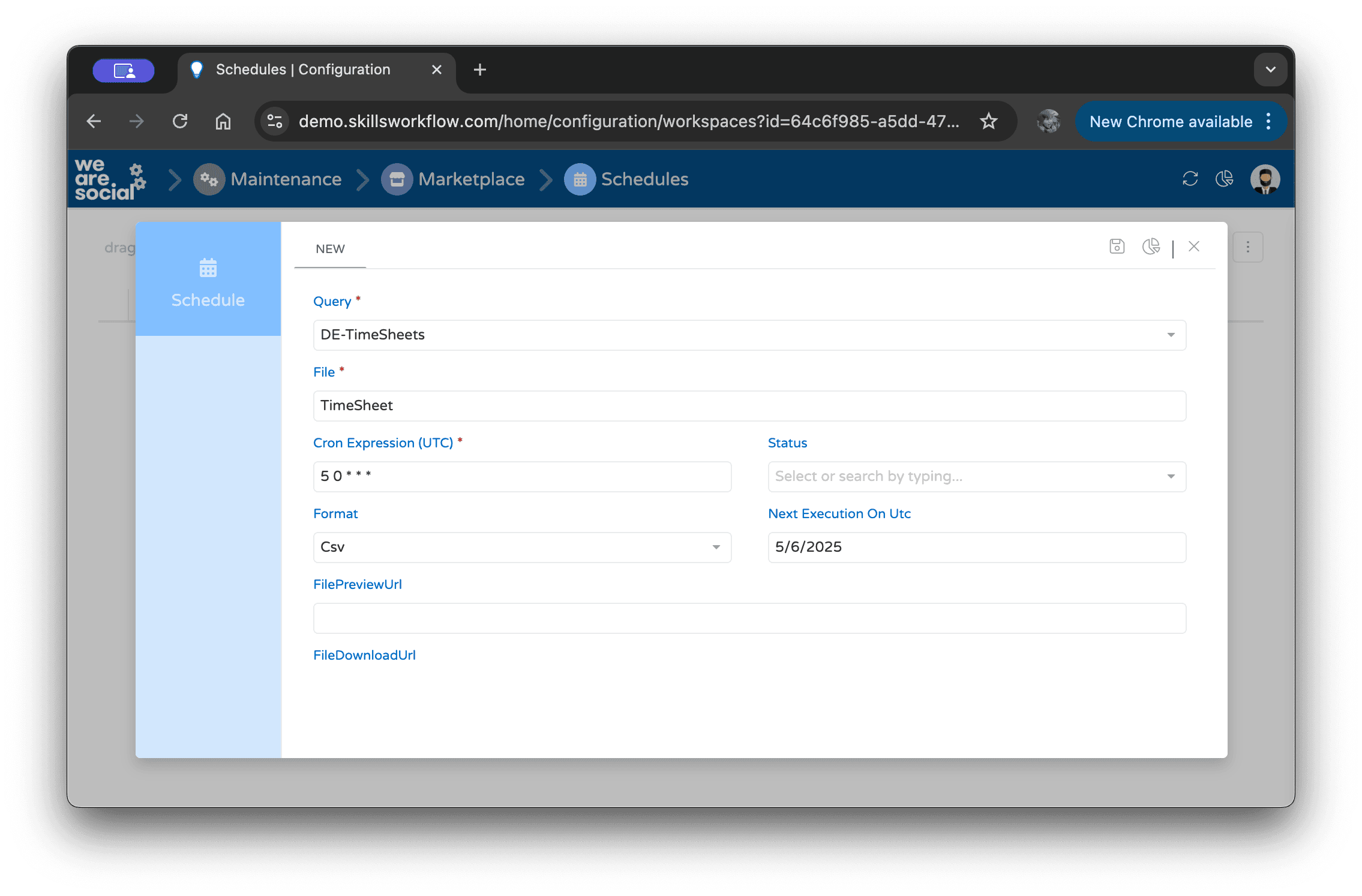
The above screenshot shows the “DE-TimeSheets” query being scheduled to export daily.
Cron Expression
The Cron Expression (UTC) field defines when the job should run. For example:
5 0 * * *
This runs the job daily at 5:00 AM UTC.
We recommend running schedules outside working hours to minimize system load and ensure the data is complete.
Data Relationships
The diagram below shows the hierarchy between Data Extractions. Use the dropdown to focus on a specific DE and its immediate parent/children, or select "All" to view the full tree. Click any node to inspect its output columns.
Click a node to inspect its output columns.