Overview
Overview sums up where the estimate stands: what has been billed and ordered, what is still to bill or order, and the costs and margin behind it. Click Overview at the top left of the Quotes tab to open it, and Editor to go back.
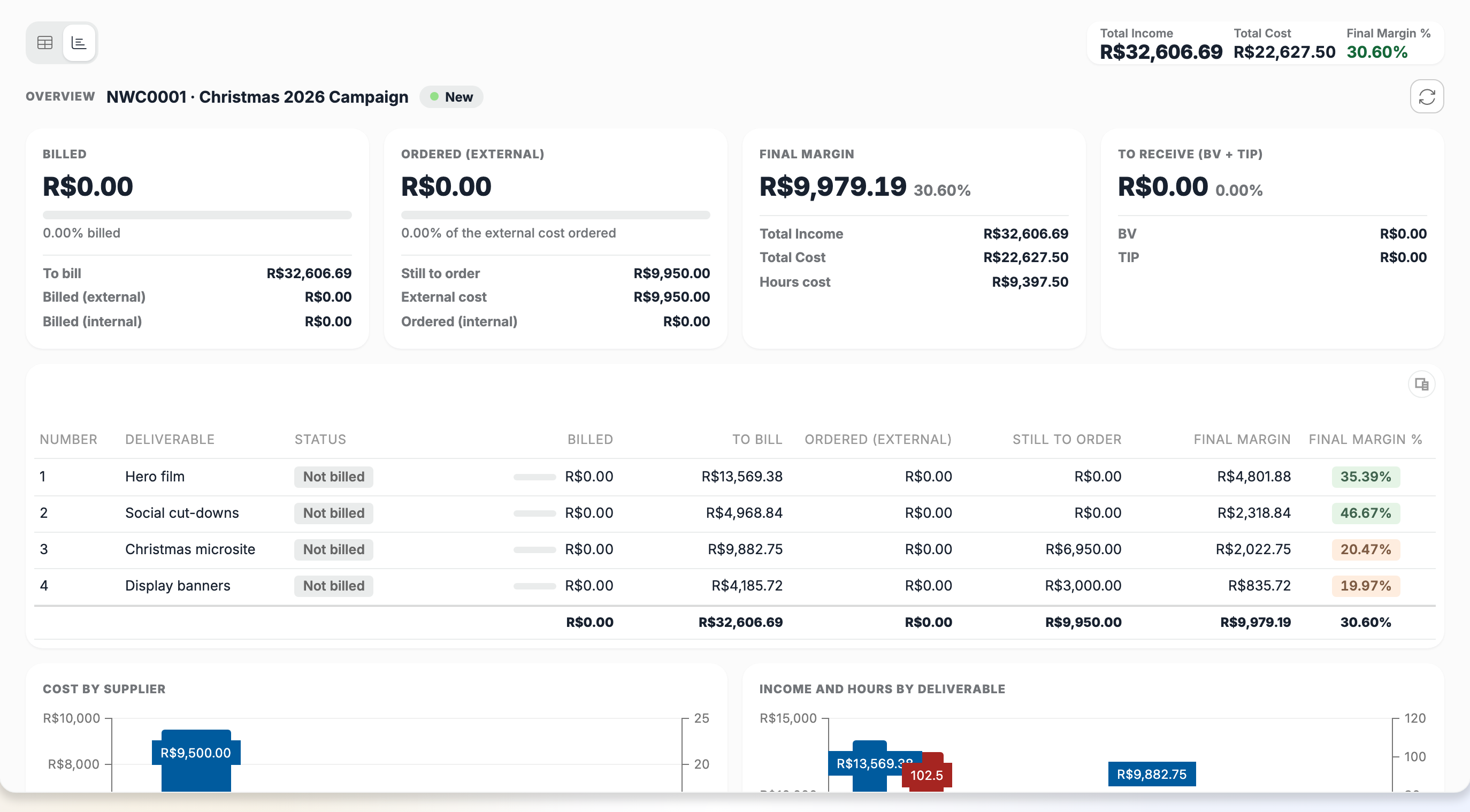
What it shows
- Billed: what has been billed and the share of the estimate it covers, what is still To bill, and the split between Billed (external) and Billed (internal).
- Ordered (external): the share of the external cost already ordered, what is Still to order, the External cost and what is Ordered (internal).
- Final margin: the margin with its percentage, the Total Income, the Total Cost and the Hours cost.
- To receive (BV + TIP): the volume discount (BV) and the supplier discount (TIP) to receive from suppliers.
- A table with one row per deliverable: its Status (Billed, Partially billed or Not billed), what is billed and still to bill, what is ordered and still to order, and its final margin.
- Cost by supplier and Income and hours by deliverable charts.
Rules and behaviour
The Overview shows saved figures. Save your changes to include them, and use Refresh to read the figures again.
Figures you have no access to, such as bills, purchase orders or suppliers, are left out, and the Overview says so. When the queries behind the Overview are missing on your tenant, or you have no access to them, it shows that it isn't available.