Prices and margins
Prices in the Quotes tab follow the estimate's settings and its formula. The exact rules are in Calculation rules.
Changing a price
Change a cost, a quantity, the hours, the Commission % or a sell value, and the related values on that line follow. The deliverable's totals and the estimate summary update as you type.
On a resource line, picking the Typology Group or the User reads the rates from the estimate's rate card.
On a services line, picking the Service reads its cost from the estimate's Price Table, when it has one, and the client's agency commission for that service.
Re-pricing resources from the rate card
Apply table rates brings every saved resource line back to the rate card.
- Save or undo your changes.
- Click Apply table rates and confirm.
Every saved resource line that has a cost in the rate card gets its rates again, loses its discount, and is saved. A line the rate card has no cost for keeps its values.
Blocked services
A services line sent as a request to another company is blocked, and its lock icon shows it. It can't be changed.
To unblock it, right-click it and choose Unblock, followed by the number of lines. Select several lines first to unblock them together. The option needs permission to unblock services.
Estimate summary
The summary on the right adds up the whole quote and updates as you type. Saving recalculates the totals.
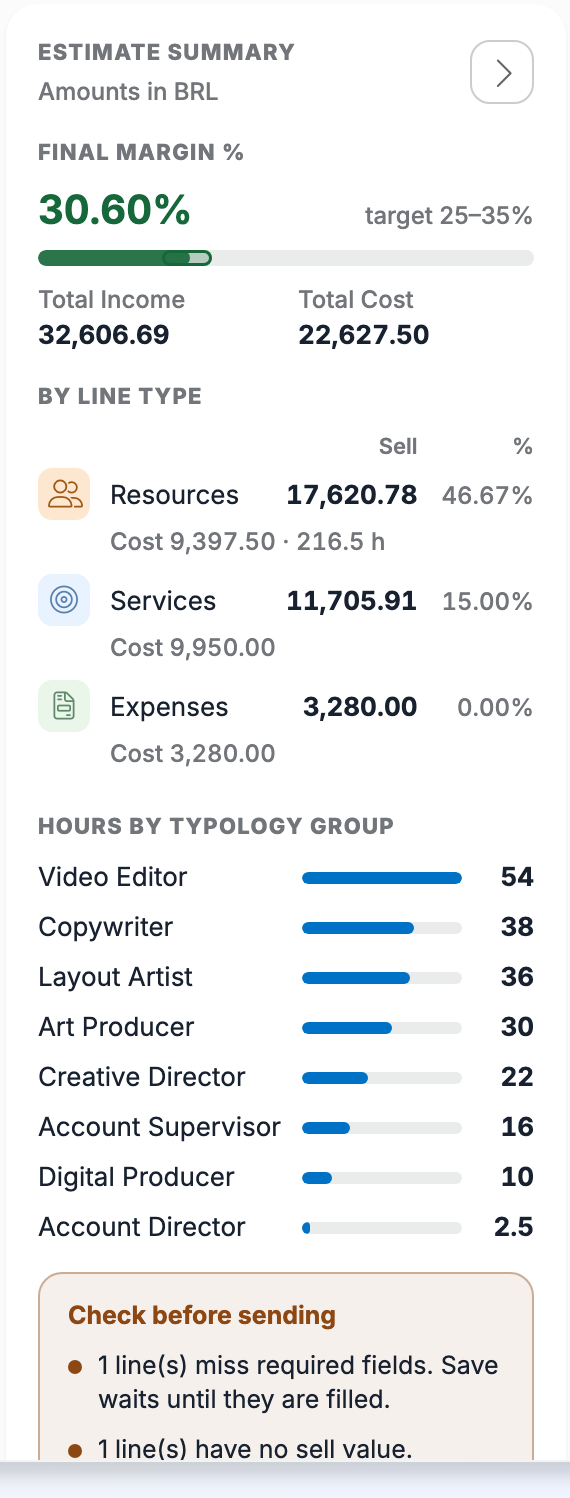
- Final Margin % is the margin of the whole estimate, with the target range under it.
- Total Income and Total Cost add up the deliverables.
- By line type splits the sell, the cost and the margin between resources, services and expenses, with the hours of the resources.
- Hours by typology group lists the roles with the most hours.
Check before sending appears when something needs attention:
- the margin is below the target;
- lines miss required fields;
- lines have no quantity or hours;
- lines have no sell value;
- some lines are approved and others are not.
Hide the summary and Show the summary close and open the panel.